Hypothetical scenario. An ad platform reports a large number of conversions for the month. The website form report shows fewer. The CRM shows fewer still. The sales report lists a handful of deals, and nobody can say which campaign produced them.
There are two possible explanations, and both can be true at once. The systems may count different things under different definitions. There may also be real tracking errors, such as broken forms, missing tags or duplicate records. Reconciling the reports means separating those two causes. This guide is for the owner, GM, marketing manager and sales manager who share those reports. It covers stage definitions, the fields to capture, cohort formulas and a weekly reconciliation worksheet you can run with your current tools.
Define the stages
| Stage | Recommended definition | Typical record |
|---|---|---|
| Inquiry | Any contact attempt: form, call, chat, text, listing lead or walk-in | Ad platform, website, phone system, CRM |
| Unique qualified lead | One de-duplicated person with usable contact details and an interest your team can act on | CRM |
| Booked appointment | A visit, sea trial, walkthrough or video call with a time and an owner | CRM or calendar |
| Showed appointment | The customer attended | CRM |
| Sale | One milestone you choose, for example delivered, linked to the lead | DMS and/or CRM |
Pick a single sale milestone and use it everywhere. If you count contracted deals in one report and delivered deals in another, the reports won't reconcile.
Several visits from one person are still one unique lead. Ad platforms count conversion events, and what those events represent depends on setup. They may be form submissions or calls, or imported qualified leads or sales. Define the configured conversion action before comparing its count with your CRM stages.
Capture the fields
These are recommended minimum fields. Rename them to fit your CRM.
| Field | What it holds |
|---|---|
| Lead ID and duplicate-of | The record's ID, and the record it was merged into, if any |
| Created timestamp | When the lead first arrived |
| Original source, medium and campaign | The first identified touch. Never overwritten. |
| Latest source | The most recent touch, kept in a separate field |
| Landing page | The first page of the session that produced the inquiry |
| Unit of interest | A stable internal unit ID, or a documented unique key such as location plus stock number plus received date |
| Inquiry type | Tour, quote, trade, finance or service |
| Owner | The assigned salesperson or BDC rep |
| Appointment | Booked timestamp, plus outcome: showed, no-show or rescheduled |
| Outcome | Sold, lost with a reason, or still active |
| Deal number and milestone date | The link from the lead to the sale |
Display the public stock number to customers, but don't match records on it alone. Stock numbers can be reused, and they can collide across stores.
CRM and DMS functions overlap differently by vendor. Whatever your setup, you need a shared key so a sale can be matched back to its lead.
Source capture at the front door
Tag inbound links only. Use UTM parameters on links you create manually from emails, social posts and listing sites. Keep ad-platform auto-tagging in place where it's configured, and don't stack manual tags on top of it without a deliberate reason. GA4 uses these values for source, medium and campaign reporting (GA4 traffic-source documentation). Don't tag menus, banners or other internal links. Internal tags can confuse campaign and event attribution.
Keep phone attribution continuous. Calls can be a large share of marine and RV inquiries. If you use tracking numbers, keep them stable by source. Make sure each call creates or updates a CRM record with the same source fields a form lead would carry. If you switch providers, plan for number continuity so calls from old ads, print and listings keep their source.
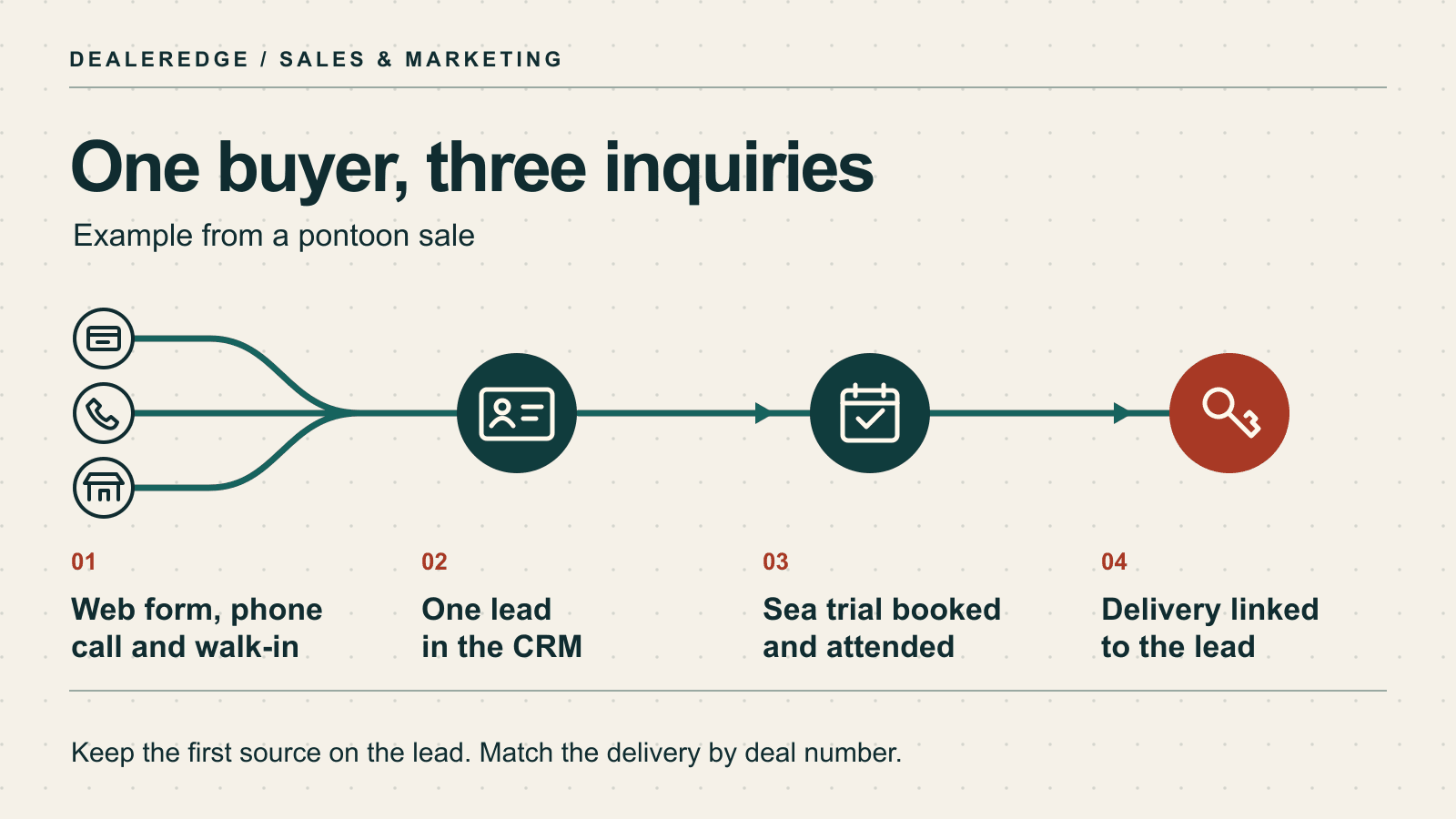
Merge duplicates by rule. Suppose one buyer submits a form, calls two days later and walks in that weekend. Merge those into one record. Keep the original source, log the later touches as interactions or update the latest source, and count one unique lead.
Accept "unknown." Walk-ins, personal referrals and show contacts often can't be traced to a campaign. Record them honestly rather than forcing them into whatever campaign was running. Watch the unknown share over time. A sudden jump may mean a capture step broke.
Line up the time periods
Marine and RV buying cycles can run for weeks or months, so choose a reporting view that fits the question:
- Lead-created cohort. Group leads by the month they arrived and follow them forward over a fixed window. Use this view to compare channels. Flag recent cohorts as immature.
- Activity period. Count what happened in a calendar month. A ratio like March spend to March deliveries is useful for budgeting and operations. It isn't cohort acquisition cost, so don't use it to rank channels.
Formulas
For one channel and one lead-created cohort:
- Cost per qualified lead = channel spend attributed to that cohort period ÷ unique qualified leads from that channel created in the period
- Cost per attended lead = the same spend ÷ unique qualified leads from that cohort with at least one attended appointment within a stated window, for example 45 days after lead creation. Count each lead once, however many visits it made.
The window is your choice. It is not an industry standard. Use the same window for every channel you compare. If the denominator is zero, report N/A. Zero attended leads does not mean zero cost.
Cheap leads can mean expensive appointments
All figures are hypothetical. They are not benchmarks. All three channels are measured on the same cohort month with a 45-day show window.
| Channel | Spend | Unique qualified leads | Cost per lead | Attended leads | Cost per attended lead |
|---|---|---|---|---|---|
| A | $2,400 | 80 | $30 | 6 | $400 |
| B | $2,400 | 30 | $80 | 10 | $240 |
| C | $600 | 5 | $120 | 0 | N/A |
Channel A wins on cost per lead. Channel B produces attended leads at lower cost. With counts this small, a few appointments can flip the result, so watch several cohorts before moving budget. Check appointment quality as well: an appointment for a unit that has already sold isn't equivalent to one for a unit on the lot.
Attribution is not causation
An attributed sale means a lead record links to a sale through the source you captured. It doesn't show that the campaign caused the sale, because some buyers would have found you anyway. If you need evidence of incremental lift, use a deliberately designed test with a concurrent, comparable control group and a defined outcome and measurement window. Small samples and differences in stock or season can still distort the result. A simple before-and-after pause doesn't prove causation.
No setup traces every buyer journey. People switch devices, browse privately, talk to friends and see boats on the water. Aim for consistent records that are honest about their gaps.
Weekly reconciliation worksheet
The MRAA Guide to CRM frames CRM as practices, strategy and technology, with people and process mattering alongside tools. Attribution needs the same ownership. A recommended weekly routine:
- Compare platform, website and phone inquiry counts with new CRM records. Explain the large gaps, separating definition differences from tracking errors.
- Merge new duplicates by your rule.
- Give every booked appointment from last week an outcome.
- Link every new sale to a lead record, or mark it as walk-in, referral or unknown.
- Review the unknown share and any sharp shifts by channel.
- Update the cohort report and flag immature cohorts.
Assign one owner. Software can automate parts of this, but a person still decides what counts as qualified and investigates mismatches. Response speed is covered in lead response timing.
Next step
Run the weekly reconciliation worksheet at least once first. The gaps it surfaces make a useful agenda for any analytics conversation.
- 1. reconciliation worksheet
- 2. analytics-focused walkthrough
Request a private analytics walkthrough and bring your recent platform, website, phone and CRM counts with your notes on the gaps. Review DealerEdge analytics and sales beforehand.
Not ready for a one-to-one conversation? Email me about the next demo to be emailed about the next session.